
RC4 is a stream cipher for bulk encryption that nowadays is considered as practically vulnerable and was officially deprecated by Internet Engineering Task Force.
- Open registry editor:
Win + R > regedit
- Navigate to:
HKEY_LOCAL_MACHINE\SYSTEM\CurrentControlSet\Control\SecurityProviders\Schannel\Ciphers
- Right-click on “Ciphers” > New > Key
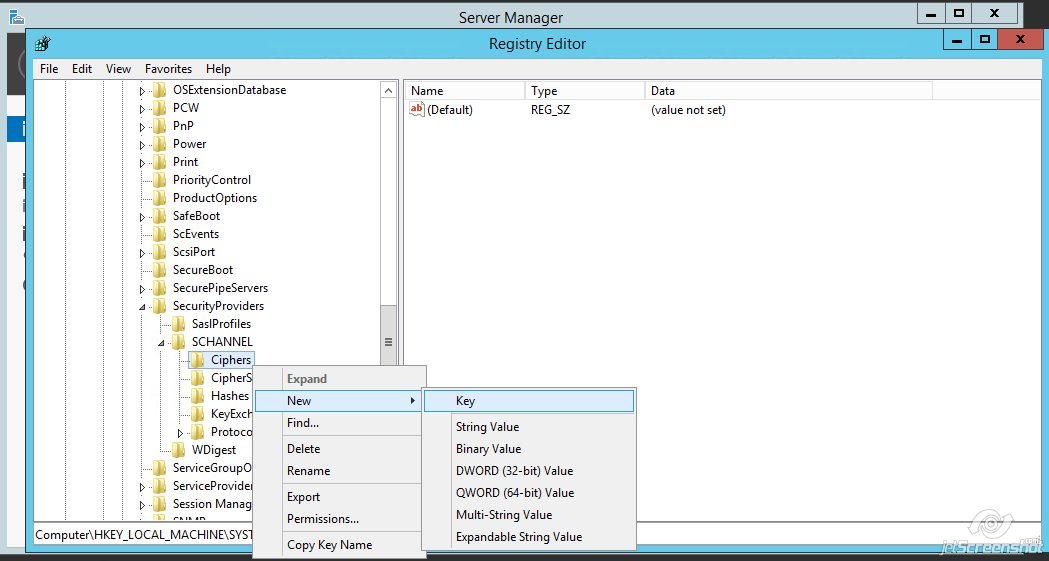
Name the key “RC4 40/128”
- Right-click on “RC4 40/128” > New > DWORD (32-bit) Value

Name the value “Enabled”
- Double-click the created “Enabled” value and make sure that there is zero (0) in ”Value Data:” field > click “OK”
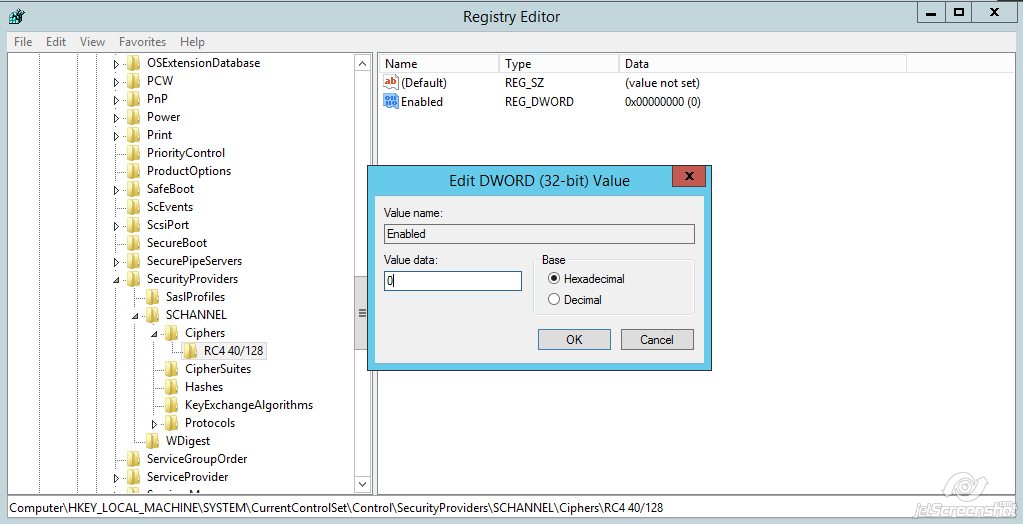
- Create two more keys with the names “RC4 56/128” and “RC4 128/128” in the “Ciphers” directory. Repeat steps 4 and 5 for each of them.
- After step 6 is completed, you should have three keys for RC4 in total in Ciphers. Each RC4 key should have the “DWORD” value named “Enabled” with zero (0) value data.

- You may need to restart Windows Server to apply the changes.
